


CakeCost
4.129.00 Reviews
App Specs
- Version
- 1.28.0
- Updated On
- License
- Free
- Downloads
- 100,000+
- Developer
- CakeCost
- Categories
- Food & Drink
- Platform
- Android
Screenshots

 Analysis by AppCompare
I decide whether a baking cost app is worth keeping by asking a practical question: will it help me make a better decision before I buy ingredients or quote a price? CakeCost is aimed at that specific moment. It is a food-and-drink app from CakeCost for working out what a cake recipe costs, rather than a general kitchen organizer or a full business-management suite. If you bake often enough that “I think this should cover it” no longer feels like a reliable way to price an order, that focus is useful.
The difference between knowing a recipe and knowing its cost can be surprisingly large. A cake may call for only a little of several ingredients, yet the actual amounts used, packaging sizes, and recipe yield all affect what each bake represents financially. A calculator can handle the arithmetic, but it asks you to organize the inputs yourself. This app’s value is in keeping the calculation connected to the recipe, so the result can inform a real choice: make the order, adjust the recipe, or reconsider the price.
Decide what you need the number to do
Before relying on any recipe-pricing tool, I’d separate three questions: what did the ingredients cost, how many portions does the recipe produce, and what price makes sense for the finished product? The first two are calculation problems. The last also involves your time, packaging, overhead, local demand, and the kind of work involved. A useful ingredient-cost figure is a starting point, not a complete business price by itself.
That distinction matters especially for decorated cakes. Two orders can use a similar sponge recipe but require very different amounts of filling, finishing, and hands-on work. I would use CakeCost to make ingredient spending easier to see, then apply my own judgement to labor and the rest of the order. If you expect an app to decide the full selling price without your input, this is the wrong expectation to bring to it.
Where a recipe-linked calculator earns its place
The app is most convincing when you make the same recipes repeatedly or adapt them often. Once you have a reliable ingredient-cost baseline, you can compare a standard version with a variation instead of guessing from memory. That becomes useful when a customer asks for a different flavor, when a preferred ingredient is unavailable, or when you want to see whether a more expensive substitution is still sensible for your budget.
For a home baker, the benefit can be less formal but just as practical. If you are planning several bakes for a family gathering, knowing which recipe uses costly ingredients helps you decide what to prepare without discovering the total only after shopping. The figure will only be as accurate as the prices and quantities you enter, but even a careful estimate can be more helpful than treating every cake as if its ingredients cost roughly the same.
There is also a useful habit hidden in the process: entering costs encourages you to notice what you actually use. A bag price is not the same as the cost of the portion that goes into one cake. Thinking in those terms makes recipe changes easier to evaluate and can reveal why a seemingly small garnish or filling choice matters across repeated orders.
Worth Reading Before You Choose

EA SPORTS FC Mobile 26 Is a Bigger Football Game, but It Takes Time

Flipboard Shows What News Apps Must Do Beyond the Feed

Switching to Android Auto Means Rethinking Your Driving Routine

Google Calendar Makes a Crowded Week Easier to Manage

Ludo King Makes the Most of the Minutes Between Plans

Baby Panda World Brings Quick Play to Modern Phones, but Its Game Library Feels Busy
How it compares with the usual alternatives
A notes app or spreadsheet can do much of the same arithmetic, and either may be better if you already have a clear system you trust. A spreadsheet offers freedom to build extra columns for labor, packaging, delivery, or overhead, but you have to maintain that structure yourself. A basic calculator is quick for one-off sums, though it is less convenient when you want to revisit a recipe or compare versions later.
CakeCost makes more sense when the recipe itself is the natural place to keep the cost calculation. That is a narrower job than managing orders, stock, invoices, or a bakery’s accounts. I would not choose it as a replacement for those tools, and a baker who mainly needs inventory tracking may be better served by software designed around stock. Its strength is the recipe-costing step, not an all-in-one business workflow.
What to check before trusting a result
For a useful calculation, enter prices in a consistent way and be precise about the amount of each ingredient used. If you buy flour in a large bag but use only part of it, the recipe should reflect the portion consumed rather than the full purchase price. The same principle applies to ingredients such as chocolate, butter, and decorations, where package price and recipe quantity can be easy to confuse.
Yield deserves equal care. A cost per serving is only meaningful if the serving count matches what you actually sell or serve. If one cake is cut into different numbers of slices for different occasions, I would treat the per-serving result as a comparison aid, not a universal price. For decorated work, I’d also keep a separate note of time and non-ingredient expenses until I know how I want to account for them.
The app is free to start, with in-app purchases listed at $8.99 per item, so I would first decide whether its recipe-based approach fits my routine before paying for anything. It has a 4.1 average from around 166 ratings and more than 100,000 installs, which suggests it has found an audience among people looking for this particular kind of baking calculation. It is rated for everyone, and the current version is 1.28.0; it runs on Android 5.1 or later. Those details make it approachable for many users, but the best test is still whether entering and revisiting your own recipes feels worthwhile.
One realistic way to try it is to use a cake you already know well rather than starting with a complicated custom order. Enter the ingredients and amounts, check whether the total feels plausible against your shopping costs, and then adjust one ingredient to see how a planned substitution changes the estimate. That small trial tells you more than a polished sample recipe would: you can see whether the units and workflow suit the way you bake, and whether the result answers a question you actually have.
Intuitive Design and User Interface
First off, let's talk about the design. When you open up CakeCost, you're greeted with a clean, user-friendly interface. It’s like walking into a well-organized kitchen. Everything you need is right at your fingertips, and you don’t have to dig through clutter to find it. The app is visually appealing and easy to navigate, making it accessible for everyone. You won't need a degree in tech to figure this one out!
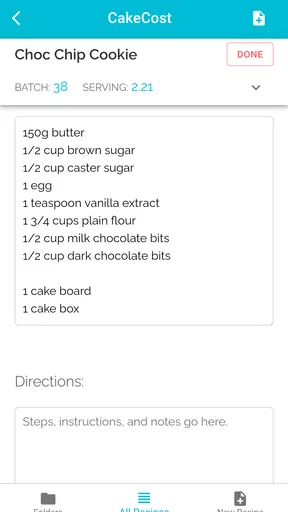
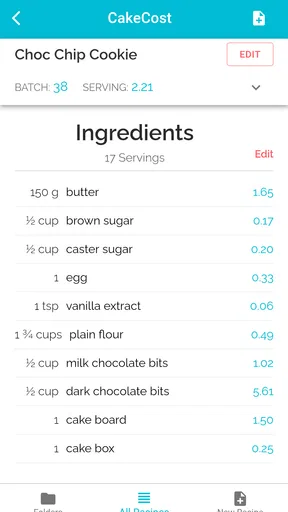
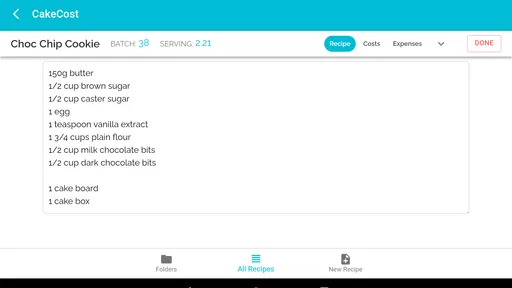
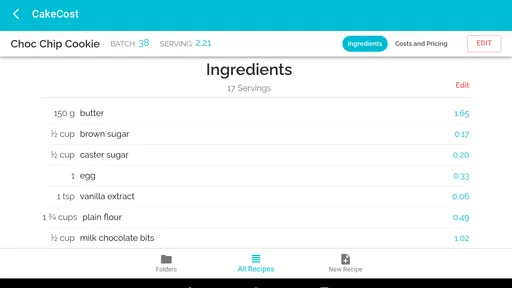
Adding ingredients and their costs is straightforward. Just tap, type, and you're done. The app also allows you to input quantities in various units, which is a lifesaver when you're juggling between ounces, grams, and cups. It even remembers your previous entries, saving you the hassle of re-entering the same data each time.
Comprehensive Cost Calculation
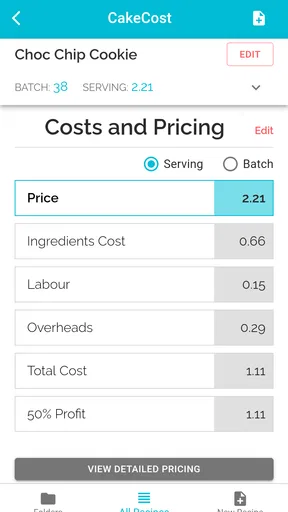
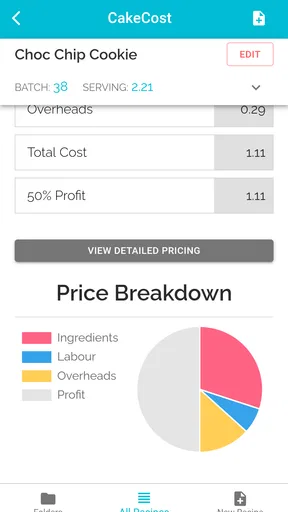
The main feature, and arguably the most crucial, is its ability to calculate the total cost of your baking project. Simply input the ingredients and their respective costs, and CakeCost does the rest. It’s like having a personal accountant for your cakes! The app calculates not only the total cost but also breaks it down per serving, which is super helpful if you're pricing for a bake sale or a special event.
One of the standout features is the ability to adjust the recipe and see how changes impact the cost. Want to switch from regular flour to almond flour? No problem. Just make the swap in the app, and you’ll see how it affects the total cost instantly. It’s a great tool for experimenting with different versions of your recipes without any financial surprises at checkout.
Perfect for Business and Hobbyists
Whether you’re a home baker or running a small bakery business, this app is a gem. For business owners, keeping track of expenses is crucial, and CakeCost provides a detailed view of your cost structure. This transparency helps in setting the right price for your products, ensuring you cover your costs while making a profit.
For hobbyists, it’s just fun to see how much your baking hobby is setting you back. Plus, it’s an excellent way to budget for your next big baking project. It’s like a reality check on your baking extravagance, and who doesn’t need a little grounding from time to time?
Extra Features That Add Value
CakeCost doesn’t stop at just cost calculation. It also offers a recipe storage feature. You can save your favorite recipes within the app, along with their cost breakdowns. This means your go-to chocolate cake recipe is just a tap away, complete with all the financial details.
Another neat addition is the ability to share your recipes and cost information. Whether you’re collaborating with a fellow baker or sharing your latest creation with friends, the app makes it easy to export and share details. It’s a great way to spread the love (and the costs) of baking.
When a different tool is the better fit
There are limits to what I would ask of a recipe calculator. If you need to track customer conversations, schedule pickups, record payments, or keep a live count of ingredients on hand, a dedicated order or inventory system is a better match. You can still use a recipe-costing app alongside one of those tools, but I would not make it the single source of truth for a busy bakery’s operations.
It may also be unnecessary if you bake occasionally and already know your typical shopping spend. The setup effort pays off most when you reuse recipes, compare variations, or regularly quote custom work. For an occasional batch of cookies, a quick calculation may be enough; for a decorated cake with several components, having the costs attached to the recipe can prevent you from overlooking an ingredient while estimating.
Another trade-off is that stored costs need attention as your shopping changes. If your supplier or package price changes, a previously saved estimate may no longer reflect what you pay now. I would revisit the ingredient costs before using an old recipe to quote a new order. This is a simple discipline, but it is the difference between a tidy-looking number and one that is genuinely useful.
A low-risk way to build a costing routine
I would begin with one dependable recipe and record the ingredient amounts and prices using the units I normally buy and measure. Then I would save it and use it as a reference before making a variation. That approach avoids the common trap of trying to enter an entire recipe collection at once, only to find the task feels like bookkeeping rather than baking.
For a customer order, I’d cost each distinct component—such as cake, filling, and decoration—rather than treating “one cake” as a single ingredient bundle. That gives a clearer picture when a design changes late in the conversation. If a customer chooses a more elaborate finish, I can identify which part of the estimate needs revisiting instead of rebuilding the whole calculation from scratch.
When sharing a recipe and its costs, I would also think about what the recipient needs to see. A friend may only want the ingredient list, while a collaborator may need the cost breakdown to plan a joint bake. Sharing is handy, but a cost figure can be misunderstood if the recipient assumes it includes labor or other business expenses. A short explanation alongside the recipe keeps the number in context.
Final Thoughts
In a world where time is money, CakeCost is a small investment that offers big returns. It simplifies the complex task of budgeting for baking, making it accessible and stress-free. Whether you're a seasoned baker or just starting out, this app is a handy companion that ensures you’re never caught off guard by the price of indulgence.
If you’re ready to take control of your baking finances, you can download CakeCost from the Google Play Store or the Apple App Store. Happy baking!
My recommendation
I’d recommend CakeCost to home bakers who want a practical way to compare recipe costs, and to cake decorators who need a clearer ingredient baseline before quoting. Its strongest case is repeated use: save a familiar recipe, keep the ingredient figures sensible, then use that reference when you plan a variation or price a similar bake. The recipe-and-cost connection is more convenient than starting a fresh sum each time.
I would skip it if your main need is accounting, order management, inventory, or a complete selling-price formula. It can help explain ingredient spending, but it cannot replace decisions about labor, packaging, and business costs. If you approach it as a focused costing companion rather than a business manager, the app has a clear purpose and can make everyday baking choices less guesswork-heavy.
Pros
- User-friendly interface for easy navigation.
- Customizable expense categories.
- Provides detailed spending reports.
- Supports multiple currencies.
- Offers data backup and sync options.
Cons
- Limited features in the free version.
- Ads can be intrusive at times.
- No offline mode available.
- Limited integration with other apps.
- Occasional syncing issues reported.
FAQs for CakeCost
What is CakeCost and how does it work?
CakeCost is a user-friendly app designed to help bakers and pastry enthusiasts calculate the cost of their creations efficiently. By inputting ingredient quantities and prices, users can quickly determine the total cost per cake or batch, ensuring accurate pricing for their baked goods and optimizing profit margins.
Is CakeCost suitable for both professionals and hobbyists?
Yes, CakeCost is designed to be versatile for both professional bakers and hobbyists. Its intuitive interface allows users at any skill level to easily input data and receive accurate cost calculations, making it an excellent tool for managing expenses in a bakery business or a home kitchen.
Can I customize ingredient prices in CakeCost?
Absolutely! CakeCost allows users to input and update ingredient prices manually. This ensures that the cost calculations reflect the most current market prices, providing an accurate assessment of expenses for each recipe. This feature is particularly useful for those who frequently purchase ingredients in bulk or on sale.
Does CakeCost support multiple currencies?
Yes, CakeCost supports multiple currencies, making it accessible for users worldwide. You can choose your preferred currency during setup, ensuring that all cost calculations align with your local financial requirements, providing a seamless experience whether you’re in the US, Europe, or elsewhere.
Is CakeCost available on both Android and iOS?
CakeCost is available on both Android and iOS platforms, ensuring accessibility for a wide range of users. You can download the app from the Google Play Store or the Apple App Store, allowing you to manage your baking costs on any compatible smartphone or tablet device.


